Introducing Native AI Agents in Blue
An AI agent built into Blue itself, not bolted on. Bring your own model key, permission-safe by design, free for every account through August 1.
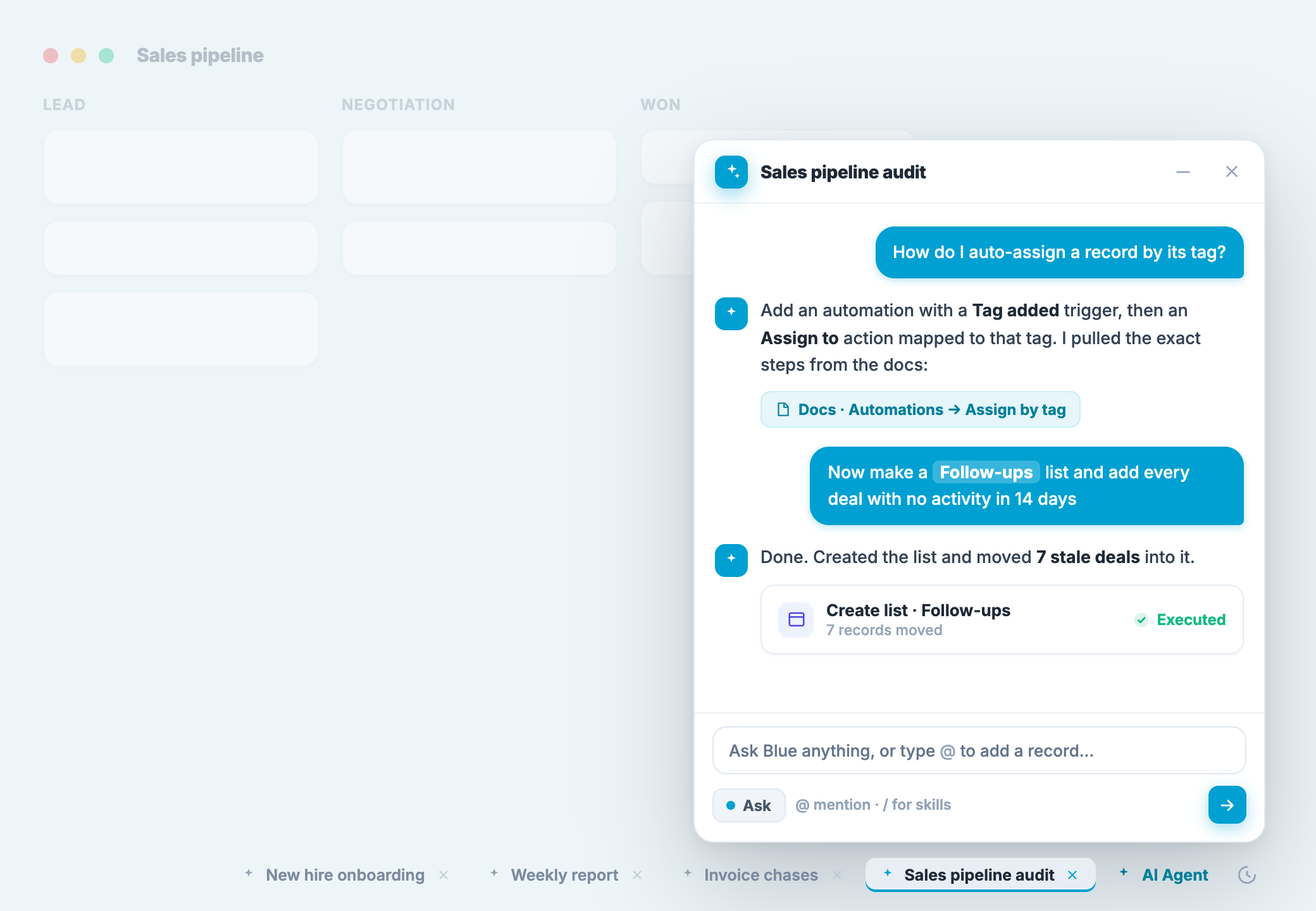
Blue now has a native AI agent: a chat panel that lives in every workspace, and an @Blue mention you can drop into any record’s comments. It reads your workspaces, answers questions straight from Blue’s own documentation, and does real work when you ask it to, create records, move a batch of them, tidy up fields, summarize where things stand.
Why I waited
I didn’t rush this out. Every other platform in this space shipped an AI feature over the last two years, and most of them shipped early, before the ecosystem had settled on how any of it should actually work. There wasn’t yet a shared understanding of what a “skill” is, how a system prompt should layer against a user prompt, what a sane approval flow looks like for an agent that can actually write to your data.
I’d rather ship one version of this and have it be right than ship three versions while the rest of the industry figures out what “right” even means. So I waited for the ecosystem to mature, watched what conventions were converging on, prompts, skills, tool-calling patterns, and then built one considered version instead of an early one.
Two ways in
You reach the agent one of two ways. A chat panel sits in the corner of Blue, ready on every page, and you can keep several conversations going at once, each tucked into its own tab. Or you skip the panel entirely and type @Blue right in a record’s comments, the same way you’d mention a teammate, and it replies in the thread for everyone on that record to see.
The hard part wasn’t the model, it was permissions
The actual engineering problem here was never getting a model to call tools. It was making sure an agent that can write to your data can never do more than the person who invoked it could do themselves.
Every tool call the agent makes runs through Blue’s existing permission system, authorized as the person who asked for it, not as some separately-privileged bot account sitting above your team’s roles. If you can’t edit a field, move a record, or even see a workspace yourself, the agent can’t do it for you either. Whichever is more restrictive, what the agent is attempting or what you’re allowed to do, is what wins.
That constraint is also the seam I built for what’s coming next. The agent identity in Blue is already its own user record per organization, provisioned lazily, with a reserved hook for a role of its own. Today that hook is unused and the agent simply inherits the invoker’s permissions. Down the line, it’s what lets an admin give an individual agent its own defined boundary, separate from any one person’s, which matters a lot once a workspace can run its own named agent (more on that below).
Safety and approvals
There are three autonomy modes, chosen per conversation: Plan, read-only, it investigates and proposes but never touches data; Ask, the default, every write shows up as a card you approve or cancel; and Auto, where lower-risk writes go through without waiting, but anything bulk, destructive, or ambiguous still stops for your yes.
What counts as “low-risk enough for Auto” isn’t a guess. A static filter rules out anything destructive, bulk, or non-reversible before it’s even considered, and everything that survives that filter still gets checked by a second, cheaper model, the checker model you choose under Settings, AI, before it’s allowed to run unattended.
The comment surface works differently, because a reply in a thread isn’t a button click. Small, single-record actions run immediately. Anything bigger, moving several records to trash, a bulk field change, gets a pending summary instead: “I can move 5 records to trash. Reply @Blue approve to run it, or @Blue cancel to skip.” When you reply, that reply itself gets classified, by the same checker model, into approve, reject, or ambiguous. Ambiguous replies, “wait, which ones?”, “maybe later,” a scope change, don’t run anything. The action only fires on a clear, unambiguous approval, and only from the person who asked for it or an org admin.
Bring your own key, and why
The agent runs on a model key your organization provides. Connect an Anthropic, OpenAI, Google, or OpenRouter key and pick exactly what powers it, including open-source models if that’s what you want.
Part of this is Blue’s mission: process management should be affordable, and that includes the AI layer, not just the seat price. Part of it is watching how other platforms meter AI usage and the customer feedback on the community forums. I’d rather you pay your model provider directly, at their price, with full visibility into what you’re spending, than meter you through an opaque credit system on top.
Your key talks to your chosen provider directly. Your conversations, and anything the agent touches, stay inside your Blue organization. Blue tracks usage per person and per workspace, and you can set a monthly spend cap that stops new calls once you hit it.
What’s next
I don’t have a fixed list of things it can’t do yet that I’m working through in order. The honest plan is to watch real usage now that it’s out, and build new tools based on what people actually try to do with it.
A few directions I already know I want to take this:
Agents with their own permissions, per workspace. Blue already has custom user roles. The natural extension is letting you create named agents scoped to a workspace, each with its own role, its own permissions, and its own prompt, so a workspace can run something closer to an actual agentic team rather than one general-purpose assistant.
A knowledge graph for workspace data, not just files. There’s a tool called CodeGraph that indexes a codebase into a semantic graph, functions, classes, call chains, so an AI agent can find what it needs by asking one question instead of searching through files. I use this as my daily driver for coding Blue. I think something similar is worth building for workspace data: a graph of how your records, fields, and processes actually connect, so the agent has real structural context instead of reconstructing it turn by turn.
Creating whole workspaces from scratch. Right now the agent works inside workspaces you’ve already built. Letting it stand up a brand-new workspace and process from a plain-language description, not just operate inside an existing one, is one of the more useful things I think it could do next.
Organization and workspace prompts
You’re not limited to the agent’s default behavior. Set an organization prompt under Settings, AI, standing guidance on vocabulary, how records should be organized, what “done” means for your team, and it applies everywhere the agent works. If one workspace needs something different, add a workspace prompt from that workspace’s own AI settings, and choose whether it appends to the organization prompt or replaces it entirely for conversations scoped there.
Skills
Skills are reusable instructions you attach to a message instead of retyping them. Save one as personal, visible only to you, or org, visible to everyone on your team. A few built-in skills ship with Blue and are ready to use right away.
Try it under Settings → AI. It’s available for all organizations until August 1st, and then available via Blue Pro.
— Manny