Automation Variables
Insert record and workspace values into automation emails, HTTP requests, and field updates.
Variables insert current record or workspace data into an automation action. Blue replaces each variable with its value when the action runs.
You can use variables in email content, HTTP requests, and supported field values.
Insert a Variable
- Place the cursor in a supported action field.
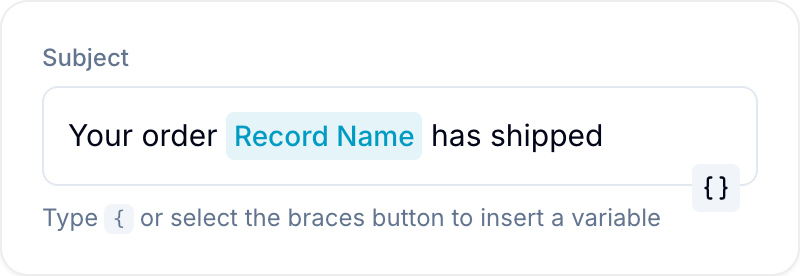
- Select the braces button, or enter the field’s variable character.
- Select a built-in value or a field. Blue inserts a variable chip.
- Save the action. Blue resolves the chip separately for each record when the automation runs.
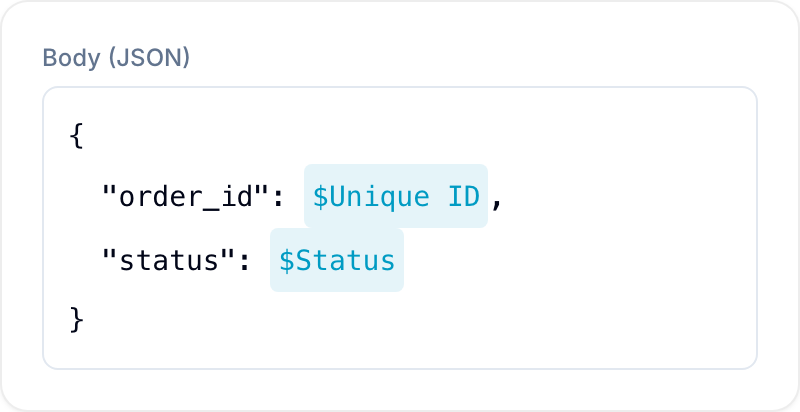
Email fields, HTTP text bodies, and plain HTTP fields use {. JSON HTTP bodies use $ because braces are part of JSON syntax.
Built-In Variables
Built-in variables include:
- Record Name, Record Created At, Record Updated At, Record Completed At, and Record URL.
- Record Assignee, Record Tags, Record Due Date, and Record Description. These read the Assignee, Tags, Due date, and Description fields of the database. If the database does not have the field, the value is empty.
- List Name and List ID. These read the List field of the database: the name and ID of the selected option.
- Workspace Name.
- Triggerer Name, Triggerer Email, and Triggerer ID of the person who started the automation.
- Bulk Trigger ID, which is shared by records in one bulk automation run, and Bulk Item Count.
The word Record in these labels follows the record name (terminology) set for the database.
Field Variables
You can select any field except a button field. Blue formats the value for the action destination.
- Text, phone, email, URL, location, and country fields return text.
- Number, currency, percent, rating, unique ID, formula, rollup, and duration fields return their formatted values.
- Date fields return a formatted date in emails and an ISO value in HTTP requests.
- Single-select fields return one option label. Multiple-select fields return a list of labels.
- Checkbox fields return
trueorfalsein email content and a Boolean value in HTTP JSON. - Assignee fields return member names.
- Reference fields return record names. Lookup fields return their resolved values.
- Table fields render as an HTML table in email content and as a text summary in HTTP requests.
- File fields have special sharing behavior.
File Variables
The default File variable embeds image thumbnails and attaches non-image files to emails. In HTTP requests, it returns file URLs. Using this variable turns on public sharing for the included files.
The picker also provides <field> (Shared links). This variable includes only files whose public links are already on.
The shared-links variable does not publish files. It returns one link per line in email content and a URL array in HTTP JSON.
Bulk Automations
For scheduled and other bulk runs, Blue resolves variables separately for each record. Each email or HTTP request receives that record’s values.
This behavior applies to email automations, HTTP requests, and supported field updates.
Behavior
- Variables use the value available when the action runs.
- An empty field produces an empty value.
- A variable for a deleted field also produces an empty value.