Triggers
Choose the event, schedule, or condition that starts an automation.
A trigger defines when an automation starts. Event triggers respond to changes, scheduled triggers run at set times, and conditional triggers respond to record-state transitions. A trigger responds only to records of the database that the automation belongs to.
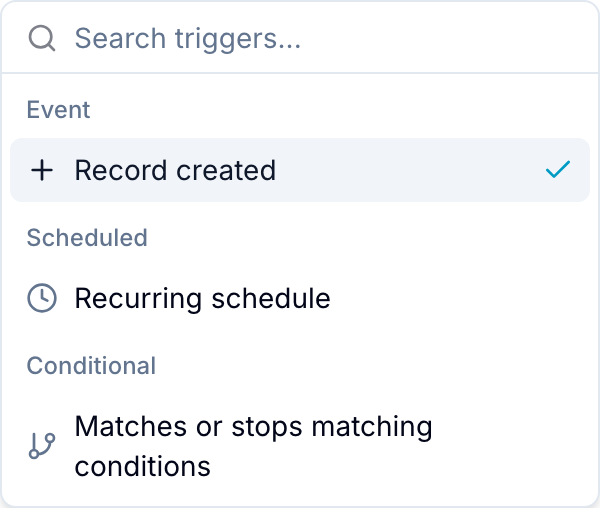
Event Triggers
Event triggers run after a specific record event or field change.
Record Events
- Record created: Runs when a record is created in the database. A form submission that creates a record also starts this trigger.
- New comment: Runs when a comment is added. You can limit the trigger with Commented by and Mentions.
- Record marked complete: Runs when a record becomes complete through the completion field of the database.
- Record marked incomplete: Runs when a completed record becomes incomplete.
- Record archived: Runs when a record is archived.
- Record unarchived: Runs when a record is restored from the archive.
- Record copied/moved from another workspace: Runs in this database after a record is copied or moved into it from another database. The copy or move can come from a person or an automation, for example the Copy record action.
- Record is added to another workspace: Runs in this database when an existing record from another database is added to it, for example by the Add to workspace action. This trigger requires Pro or Enterprise.
Field Changes
- Date has changed: Runs when a selected date field is set or changed. Due date (default) is the Due date field of the database.
- Date is removed: Runs when a selected date field is cleared.
- Date has expired: Runs relative to a selected date field. Set the trigger before, after, or at expiration. You can restrict it to incomplete records. Read Relative Due Date Triggers.
- All checklist items marked as complete: Runs when every checklist item on a record is complete.
- Checklist item marked incomplete: Runs when a completed checklist item becomes incomplete.
- Field value is set: Runs when a field receives a value, or when a value is added to a multi-value field. Supported types are Checkbox, Select (single), Select (multi), Assignee, Reference, Text, Number, Percent, Rating, Currency, Email, URL, Phone, Country, and Location. For select, assignee, and reference fields, you can limit the trigger to specific values.
- Field value is removed: Runs when a value is removed from one of the same field types.
- Field value changed: Runs when a field changes from one value to another. Set From and To to Any value, Empty, or Specific values. Supported types are Select (single), Text, Number, Percent, Rating, Currency, Email, URL, Phone, Country, and Location.
- Button clicked: Runs when a person selects the configured button field on a record.
Only if
In an event automation, Only if adds conditions that the changed record must also match. Blue checks them after the event and before the actions run. Leave Only if empty to always run the actions.
GitHub
GitHub triggers appear only when the workspace has a linked repository. The repository must be linked to this database. See GitHub integration to connect one. Each trigger accepts an optional branch filter that matches against the branch the event targets.
- Branch created: Runs when a branch that references a record is created.
- Pull request opened: Runs when a linked pull request is opened.
- Pull request marked as draft: Runs when a linked pull request is converted to a draft.
- Review requested: Runs when a review is requested on a linked pull request.
- Pull request approved: Runs when a linked pull request is approved.
- Changes requested: Runs when a reviewer requests changes on a linked pull request.
- Pull request merged: Runs when a linked pull request is merged.
- Pull request closed: Runs when a linked pull request is closed without merging.
- Pull request reverted: Runs when a merged pull request is reverted.
- Checks passed: Runs when CI checks pass on a linked pull request.
- Checks failed: Runs when CI checks fail on a linked pull request.
- Commit pushed to default branch: Runs when a commit that references a record is pushed to the repository’s default branch.
Scheduled Triggers
- On schedule: Runs daily, weekly, monthly, yearly, or on a cron expression. Blue applies the actions to the records of the database that match the filter when the schedule runs. Read Scheduled Automations.
Scheduled automations require Pro or Enterprise.
Conditional Triggers
- When conditions met: Runs when a record starts or stops matching a set of filter conditions. It responds to a change in the record’s overall state. Read Conditional Automations.
Conditional automations require Pro or Enterprise.