Inbox
Read and reply to record comments, chats, direct messages, and AI conversations across your current organization.
Inbox combines record comments, status update comments, workspace chats, direct messages, and AI conversations in one cross-workspace list.
Open Inbox from the main sidebar. It appears with Home, Assignments, and the other organization views, outside individual workspaces.
View conversations
Inbox contains four conversation types:
- Records: Comment threads on records and status updates. All comments and replies for one item appear in one entry. New replies update that entry.
- Chats: Workspace chat topics that you belong to.
- Direct messages: Private direct or group conversations.
- AI: Your standalone conversations from the AI panel. AI replies in record comments remain under Records.
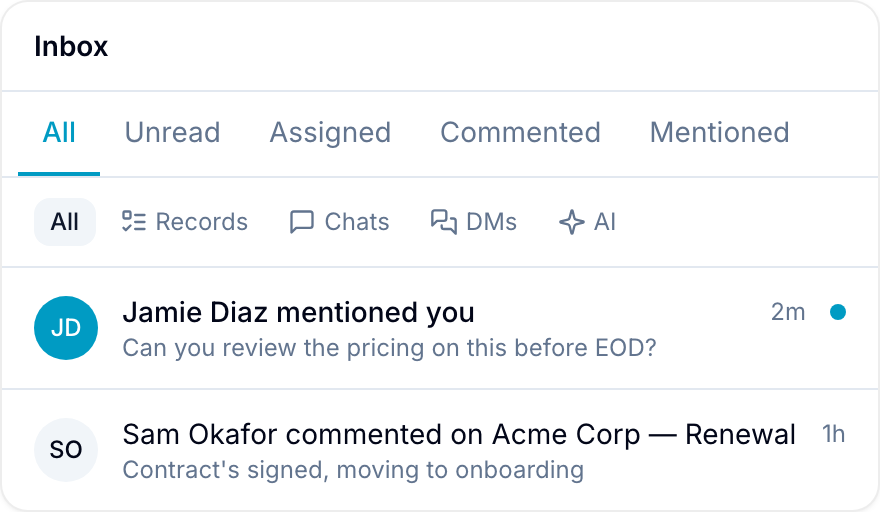
Each entry shows the last active person, a preview of the latest message, and its time. Blue sorts the most recently active conversations first.
Filter Inbox
Select a tab at the top of Inbox:
- All: All conversations that you can access.
- Unread: Conversations with activity you have not read.
- Assigned: Records assigned to you.
- Commented: Threads that you have commented on.
- Mentioned: Threads that mention you.
Use the second filter to select Records, Workspace chats, Direct messages, or AI. The tab and conversation-type filters work together.
For example, select Unread and Workspace chats to view unread chat topics.
Search Inbox
Select the search icon next to New message and type to filter the list by message content. Blue matches chat messages and record comments, including record titles and field values — not just the names shown in the list.
Select a result to open the conversation at the message that matched. Blue scrolls to that message and highlights it.
Search covers chats and record threads. Standalone AI conversations are not searched, so they do not appear while a search is active.
Read and reply
Select an entry to open its full conversation. Record comments, chat messages, direct messages, and AI replies use the same reading view.
Scroll through the conversation and reply from Inbox.
For a record or workspace chat entry that provides the action, right-click it and select Open in new tab. Blue opens the record or chat in its workspace.
This action is not available for direct messages, standalone AI conversations, or status update threads.
Track unread activity
Inbox updates new messages, replies, and mentions in real time. You do not need to refresh the page.
A blue dot appears beside Inbox in the sidebar when you have unread activity. Read status synchronizes across signed-in devices and browser tabs.
Privacy
Your AI conversations are private. Other organization members, including organization owners, cannot view them.
Workspace roles and permissions control record comment and chat visibility. Inbox does not show a conversation that you cannot access in its workspace.