Introduction
Learn how workspace roles control what each person can view, create, edit, and manage in Blue.
Blue assigns each person a role separately in each workspace. For example, you can be a Project Administrator in one workspace and have View Only permissions in another.
Manage workspace access
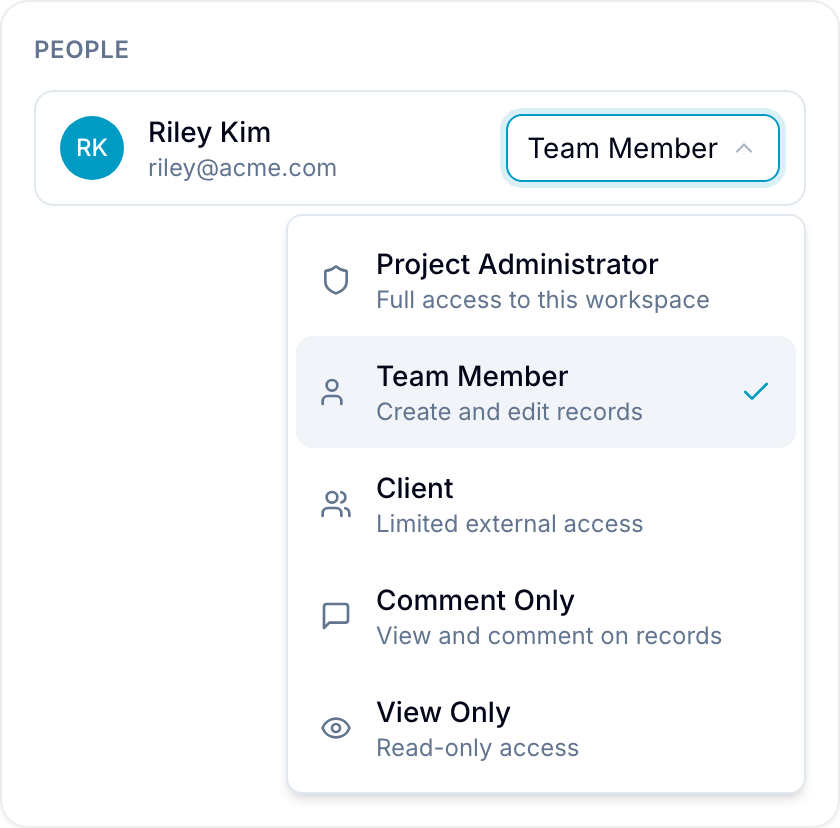
Open People in a workspace to view its members and their roles. The role picker shows Project Administrator as Admin and Team Member as Member. Workspace Owners and Project Administrators can invite people into any standard role. Team Members can invite Team Members, Clients, Comment Only users, and View Only users. Clients can invite Clients, Comment Only users, and View Only users. Comment Only and View Only users cannot invite anyone. Only Workspace Owners and Project Administrators can remove people from a workspace.
Manage dashboard access
Blue manages dashboards at the organization level. A dashboard creator controls who can view or edit the dashboard.
Viewers can open the dashboard. Editors can change its charts and sharing settings. Only the creator can rename it. Viewers cannot share the dashboard.
Compare standard role permissions
The following table compares the standard roles:
| Action | Admin | Member | Client | Comment | View |
|---|---|---|---|---|---|
| Copy Workspace | ✅ | ❌ | ❌ | ❌ | ❌ |
| Create Workspace Template | ✅ | ❌ | ❌ | ❌ | ❌ |
| Archive Workspace | ✅ | ❌ | ❌ | ❌ | ❌ |
| Delete Workspace | ✅ | ❌ | ❌ | ❌ | ❌ |
| Edit Workspace | ✅ | ❌ | ❌ | ❌ | ❌ |
| Edit Docs | ✅ | ✅ | ❌ | ❌ | ❌ |
| Import/Export CSV | ✅ | ❌ | ❌ | ❌ | ❌ |
| Add New Records | ✅ | ✅ | ✅ | ❌ | ❌ |
| Manage Databases | ✅ | ❌ | ❌ | ❌ | ❌ |
| Add Board Columns | ✅ | ❌ | ❌ | ❌ | ❌ |
| Delete Any Record | ✅ | ✅ | ❌ | ❌ | ❌ |
| Delete Own Record | ✅ | ✅ | ✅ | ❌ | ❌ |
| Manage Automations | ✅ | ❌ | ❌ | ❌ | ❌ |
| Manage Fields | ✅ | ❌ | ❌ | ❌ | ❌ |
| Upload from Files tab | ✅ | ✅ | ✅ | ❌ | ❌ |
| Attach files to comments | ✅ | ✅ | ✅ | ✅ | ❌ |
| Edit Forms | ✅ | ✅ | ❌ | ❌ | ❌ |
| Comment | ✅ | ✅ | ✅ | ✅ | ❌ |
| Invite Other Members* | ✅ | ✅ | ✅ | ❌ | ❌ |
Manage Databases covers creating, renaming, deleting, and reordering databases. Add Board Columns covers adding and renaming the options of the field that groups a board.
*Workspace Owners and Project Administrators can invite people into any standard role. Team Members can invite Team Member or lower, and Clients can invite Client or lower. A custom role with Invite others enabled can invite people into that same custom role.
Creating a workspace is controlled by your organization role, not by your role in an existing workspace. Organization Owners, Administrators, and Members can create workspaces. Organization Clients cannot.