Notifications
Choose which Blue events send email or push notifications and mute notifications by workspace.
Blue can send notifications by email or push. Configure event and workspace settings to control which notifications you receive.
This video gives an overview of notifications:
Enable push notifications
Push notifications can appear without an open Blue tab when your browser and operating system allow background delivery.
If you blocked notifications, enable them in your browser settings first. Then open your Blue notification settings and select Enable when prompted.
Configure notifications
You can configure notifications for the current organization in three ways.
Enable or disable all notifications
Use the master toggle to enable or disable all notifications for the current organization. When disabled, Blue sends you no notifications from that organization.
Select event types and channels
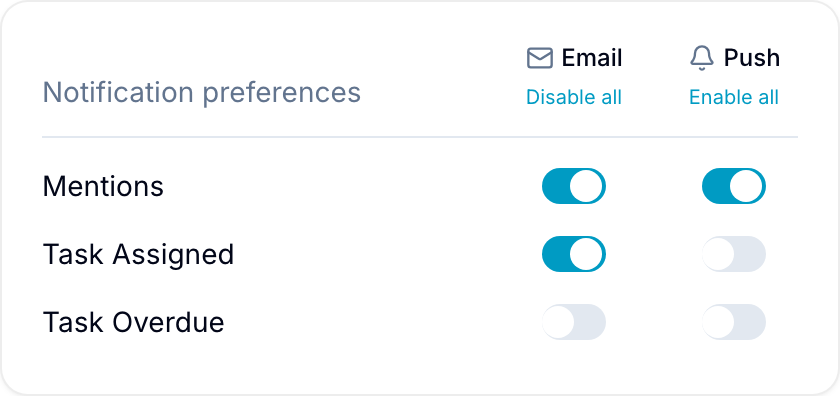
For each event type, enable email, push, or both. Blue groups the event types by how close they are to you.
Direct:
- Mentions
- Assigned to you
- Checklist item assigned
- Direct messages
Your work:
- Comments
- Due soon
- Overdue
- Due date changed
- Marked complete
- Checklist due date changed
- Checklist item overdue
Workspace activity:
- New record created
- New discussion
- Added to a workspace
- Someone joins a workspace
Use Enable all or Disable all at the top of a column to set every event for email or for push at once.
Limit an event to records assigned to you
The Assigned column limits an event to records that are assigned to you. When it is off, you receive the event for every record you can see.
Blue matches the assignment against every Assignee field on the record. An assignment in any one of them is a match.
Assigned is available for these events:
- Comments
- New record created
- Overdue
- Due soon
- Due date changed
- Marked complete
The column is disabled for every other event. Mentions, assignments, and direct messages are already addressed to you, and workspace and checklist item events have no record assignee to match against.
Assigned is independent of the Email and Push columns. It narrows which records send the event; the Email and Push columns still decide where it is delivered.
Configure each workspace
Enable or disable notifications for each workspace in the organization. Disabling a workspace mutes its notifications, except for mentions.
Blue always delivers mention notifications, regardless of the workspace setting.