'%20fill='%23fff'%3e%3cpath%20d='M24%20364.337V24h141.909c25.481%200%2046.833%203.601%2064.056%2010.803%2017.222%207.191%2030.183%2017.279%2038.882%2030.24s13.049%2027.972%2013.049%2045.041c0%2012.961-2.72%2024.513-8.148%2034.645-5.429%2010.142-12.906%2018.534-22.431%2025.174-9.526%206.651-20.548%2011.299-33.069%2013.953v3.325c13.732.661%2026.451%204.383%2038.134%2011.134%2011.684%206.762%2021.077%2016.155%2028.168%2028.17%207.092%2012.025%2010.638%2026.231%2010.638%2042.628%200%2018.281-4.647%2034.601-13.952%2048.939-9.305%2014.35-22.762%2025.648-40.381%2033.908-17.607%208.248-38.992%2012.377-64.143%2012.377H24zm82.258-200.414h45.534c8.975%200%2016.947-1.497%2023.929-4.493s12.432-7.312%2016.374-12.961c3.931-5.65%205.902-12.466%205.902-20.439%200-11.409-4.041-20.384-12.135-26.926-8.082-6.53-18.995-9.801-32.738-9.801h-46.866v74.62zm0%20134.109h50.853c17.839%200%2030.987-3.381%2039.466-10.131%208.479-6.762%2012.708-16.178%2012.708-28.247%200-8.755-2.049-16.309-6.145-22.686-4.096-6.365-9.922-11.298-17.443-14.789-7.532-3.491-16.561-5.231-27.089-5.231h-52.339v81.095l-.011-.011zM388.865%2024v340.337h-81.256V24h81.256zm181.618%20230.159V109.082h81.091v255.255h-77.435v-47.529h-2.665c-5.649%2015.616-15.263%2028.004-28.829%2037.145-13.578%209.14-29.941%2013.71-49.102%2013.71-17.398%200-32.683-3.986-45.864-11.97-13.181-7.973-23.433-19.14-30.745-33.489s-11.023-31.165-11.133-50.437V109.082h81.256v146.739c.11%2013.854%203.766%2024.767%2010.968%2032.74s17.002%2011.96%2029.413%2011.96c8.082%200%2015.372-1.795%2021.847-5.407%206.486-3.601%2011.628-8.865%2015.45-15.781%203.821-6.927%205.737-15.318%205.737-25.174h.011zm224.376%20115.002c-26.704%200-49.718-5.286-69.044-15.869-19.337-10.583-34.181-25.703-44.532-45.371-10.362-19.668-15.537-43.069-15.537-70.215s5.208-49.445%2015.614-69.212c10.418-19.779%2025.096-35.174%2044.037-46.197s41.261-16.53%2066.962-16.53c18.17%200%2034.787%202.83%2049.851%208.48s28.08%2014.007%2039.048%2025.086%2019.501%2024.734%2025.591%2040.966%209.14%2034.81%209.14%2055.756v20.273H694.145v-47.199h146.226c-.11-8.633-2.159-16.342-6.145-23.104s-9.448-12.047-16.374-15.869-14.866-5.726-23.841-5.726-17.233%202.015-24.424%206.057c-7.202%204.052-12.906%209.537-17.112%2016.452-4.207%206.927-6.431%2014.757-6.652%2023.512v48.025c0%2010.417%202.049%2019.525%206.145%2027.332s9.911%2013.876%2017.454%2018.193c7.532%204.317%2016.506%206.486%2026.924%206.486%207.201%200%2013.731-1.002%2019.612-2.995%205.869-1.993%2010.912-4.923%2015.119-8.81%204.206-3.876%207.367-8.645%209.47-14.294l74.616%202.158c-3.105%2016.728-9.889%2031.264-20.361%2043.62s-24.182%2021.937-41.129%2028.743c-16.947%206.816-36.559%2010.219-58.825%2010.219l.011.033z'/%3e%3c/g%3e%3cdefs%3e%3cclipPath%20id='A'%3e%3cpath%20fill='%23fff'%20transform='translate(24%2024)'%20d='M0%200h892v345.161H0z'/%3e%3c/clipPath%3e%3c/defs%3e%3c/svg%3e)
Formula
Calculate numeric, text, date, duration, or Yes/No results from fields in the same record.
A Formula custom field calculates a result from other fields in the same record. Use formulas for numeric calculations, text, dates, durations, and conditional results.
Watch this video for an overview of Formula custom fields:
Reference record fields
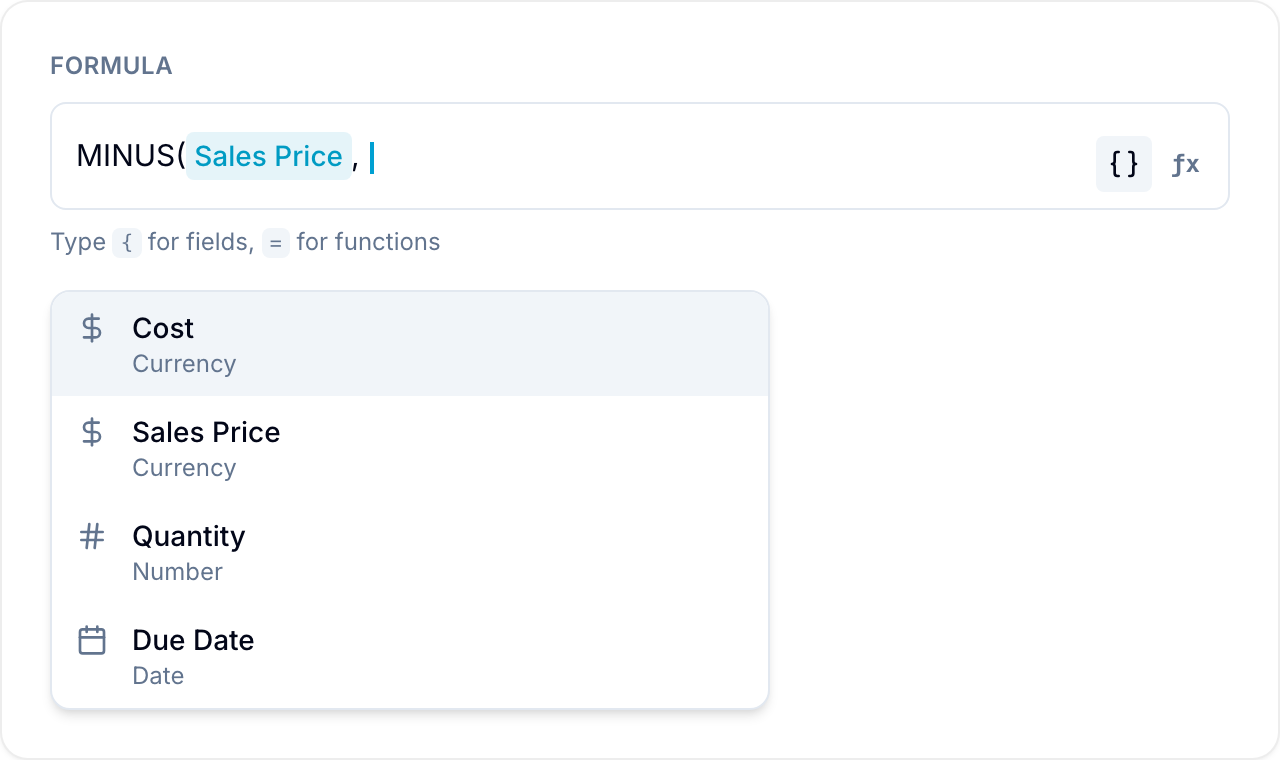
Enter a curly bracket { to show the fields that you can reference. A formula reads fields from the same record. It does not read other records or external sources.
You can reference:
- Number fields: Number, Currency, Percent, Rating, and another Formula.
- Lookup and Rollup fields, when they resolve to a number.
- Text fields: Text, Email, URL, and Phone.
- Checkbox fields: Read as a Yes/No (true or false) value.
- Date fields: Compare dates or calculate with them.
- Table field columns: Reference the sum of a Table column. A non-currency column appears in the
{picker when it has a SUM total. Blue shows it asTable field: Columnand reads the total across all rows. For example, calculate a total time estimate from a Table column of per-subtask hours.
Functions
Pass fields to a function to calculate with them. Separate multiple inputs with a comma. For example, SUM({Cost}, {Profit}) adds fields named Cost and Profit.
Math and numbers
- SUM: Add all the values together.
- AVERAGE: The mean of the values (empty values are ignored).
- AVERAGEA: The mean, with empty or non-numeric values counted as zero.
- COUNT: How many of the values are numbers.
- COUNTA: How many values are not empty.
- MAX: The largest value.
- MIN: The smallest value.
- MULTIPLY: Multiply two values with
MULTIPLY(value1, value2). - MINUS: Subtract the second value from the first with
MINUS(value1, value2). - ROUND: Round to a number of decimal places with
ROUND(value, decimals). Omit the decimal value to round to a whole number. - ABS: The absolute (positive) value.
Logic and conditions
- IF: Return one value when a condition is true and another when it is false with
IF(condition, then, else). - AND: Return Yes only when every condition is true with
AND(a, b, ...). - OR: Return Yes when any condition is true with
OR(a, b, ...). - NOT: Change a Yes to a No, or a No to a Yes, with
NOT(condition).
Text
- CONCAT: Join values into one text value with
CONCAT(value1, value2, ...). - TEXT: Convert any value to text with
TEXT(value).
Dates and time
- DATE: Build a date from text with
DATE("2026-01-31")or from parts withDATE(year, month, day). - NOW: The current date and time.
- DATEADD: Add an amount of time to a date with
DATEADD(date, amount, "days"). - DATEDIF: Calculate the difference between two dates with
DATEDIF(start, end, "days"). - DURATION: Create a length of time with
DURATION(amount, "hours").
For the date functions, the unit is one of years, months, weeks, days, hours, minutes, or seconds. DURATION also accepts milliseconds.
Operators
Combine values with these arithmetic operators:
| Operator | Description |
|---|---|
| + | Addition |
| - | Subtraction |
| * | Multiplication |
| / | Division |
| ^ | Exponentiation |
Add % after a number to enter a percentage. Blue reads 50% as 0.5.
Conditions and comparisons
Comparison operators check two values and return Yes or No (true or false). Use them inside IF or by themselves.
| Operator | Description |
|---|---|
| > | Greater than |
| < | Less than |
| >= | Greater than or equal to |
| <= | Less than or equal to |
| == | Equal to |
| != | Not equal to |
For example, IF({Budget} - {Spent} < 0, "Over budget", "On track") shows a warning when spending exceeds the budget. {Score} >= 80 returns Yes when a record reaches the threshold.
Working with text
CONCAT joins fields and quoted text into one line. For example, CONCAT({First name}, " ", {Last name}) produces a full name. CONCAT("Invoice #", {Number}) adds a label before a number. Put fixed text in double quotes.
When a text field contains a numeric value, Blue reads it as a number. For example, "5" works as 5. Blue treats other text as blank, so it does not break a sum or average.
Working with dates and time
Date functions calculate with Date fields and values from DATE and NOW. DATEDIF({Start}, {Due}, "days") counts the days between two dates. DATEADD({Start}, 30, "days") finds the date 30 days later. DATEDIF({Created}, NOW(), "days") shows the record age.
The following example calculates profit from sales price and cost:
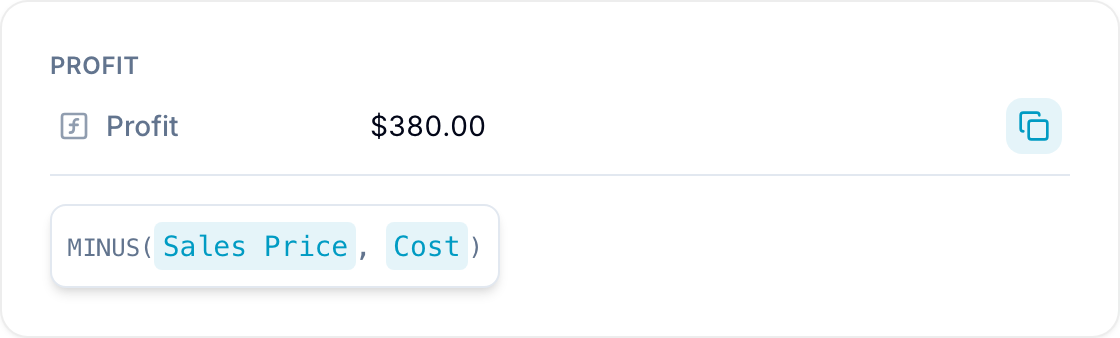
A Formula expression can contain up to 2,000 characters. Blue also validates the expression syntax when you save the field.
Configure the result display
When a formula returns a number, choose how Blue displays the result:
- Number: Show a plain numeric value. Select the number of decimal places to display.
- Currency: Show money with local formatting. Blue supports numerous global currencies.
- Percentage: Convert the calculated value to a percentage.
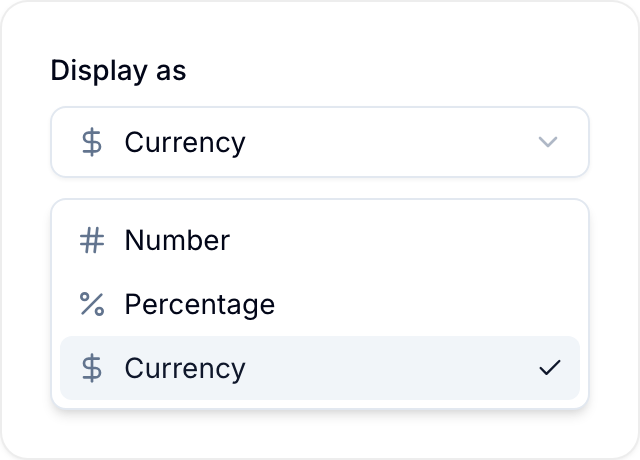
If a formula returns text, a date, a length of time, or a Yes/No, Blue shows the result directly. Display options apply only to numeric results.
Hover over the field to view the formula logic.
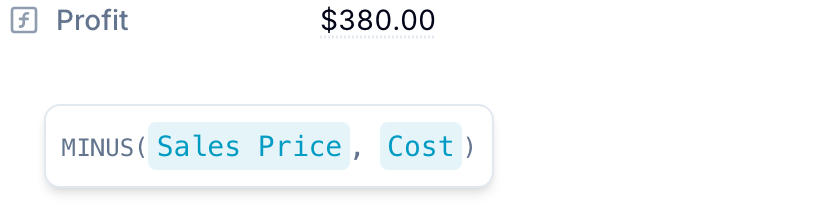
Formula results update in real time when referenced values change. Exported data contains calculated results instead of the formulas.