'%20fill='%23fff'%3e%3cpath%20d='M24%20364.337V24h141.909c25.481%200%2046.833%203.601%2064.056%2010.803%2017.222%207.191%2030.183%2017.279%2038.882%2030.24s13.049%2027.972%2013.049%2045.041c0%2012.961-2.72%2024.513-8.148%2034.645-5.429%2010.142-12.906%2018.534-22.431%2025.174-9.526%206.651-20.548%2011.299-33.069%2013.953v3.325c13.732.661%2026.451%204.383%2038.134%2011.134%2011.684%206.762%2021.077%2016.155%2028.168%2028.17%207.092%2012.025%2010.638%2026.231%2010.638%2042.628%200%2018.281-4.647%2034.601-13.952%2048.939-9.305%2014.35-22.762%2025.648-40.381%2033.908-17.607%208.248-38.992%2012.377-64.143%2012.377H24zm82.258-200.414h45.534c8.975%200%2016.947-1.497%2023.929-4.493s12.432-7.312%2016.374-12.961c3.931-5.65%205.902-12.466%205.902-20.439%200-11.409-4.041-20.384-12.135-26.926-8.082-6.53-18.995-9.801-32.738-9.801h-46.866v74.62zm0%20134.109h50.853c17.839%200%2030.987-3.381%2039.466-10.131%208.479-6.762%2012.708-16.178%2012.708-28.247%200-8.755-2.049-16.309-6.145-22.686-4.096-6.365-9.922-11.298-17.443-14.789-7.532-3.491-16.561-5.231-27.089-5.231h-52.339v81.095l-.011-.011zM388.865%2024v340.337h-81.256V24h81.256zm181.618%20230.159V109.082h81.091v255.255h-77.435v-47.529h-2.665c-5.649%2015.616-15.263%2028.004-28.829%2037.145-13.578%209.14-29.941%2013.71-49.102%2013.71-17.398%200-32.683-3.986-45.864-11.97-13.181-7.973-23.433-19.14-30.745-33.489s-11.023-31.165-11.133-50.437V109.082h81.256v146.739c.11%2013.854%203.766%2024.767%2010.968%2032.74s17.002%2011.96%2029.413%2011.96c8.082%200%2015.372-1.795%2021.847-5.407%206.486-3.601%2011.628-8.865%2015.45-15.781%203.821-6.927%205.737-15.318%205.737-25.174h.011zm224.376%20115.002c-26.704%200-49.718-5.286-69.044-15.869-19.337-10.583-34.181-25.703-44.532-45.371-10.362-19.668-15.537-43.069-15.537-70.215s5.208-49.445%2015.614-69.212c10.418-19.779%2025.096-35.174%2044.037-46.197s41.261-16.53%2066.962-16.53c18.17%200%2034.787%202.83%2049.851%208.48s28.08%2014.007%2039.048%2025.086%2019.501%2024.734%2025.591%2040.966%209.14%2034.81%209.14%2055.756v20.273H694.145v-47.199h146.226c-.11-8.633-2.159-16.342-6.145-23.104s-9.448-12.047-16.374-15.869-14.866-5.726-23.841-5.726-17.233%202.015-24.424%206.057c-7.202%204.052-12.906%209.537-17.112%2016.452-4.207%206.927-6.431%2014.757-6.652%2023.512v48.025c0%2010.417%202.049%2019.525%206.145%2027.332s9.911%2013.876%2017.454%2018.193c7.532%204.317%2016.506%206.486%2026.924%206.486%207.201%200%2013.731-1.002%2019.612-2.995%205.869-1.993%2010.912-4.923%2015.119-8.81%204.206-3.876%207.367-8.645%209.47-14.294l74.616%202.158c-3.105%2016.728-9.889%2031.264-20.361%2043.62s-24.182%2021.937-41.129%2028.743c-16.947%206.816-36.559%2010.219-58.825%2010.219l.011.033z'/%3e%3c/g%3e%3cdefs%3e%3cclipPath%20id='A'%3e%3cpath%20fill='%23fff'%20transform='translate(24%2024)'%20d='M0%200h892v345.161H0z'/%3e%3c/clipPath%3e%3c/defs%3e%3c/svg%3e)
Rollup
Calculate one summary value from records linked through a Reference or Referenced By field.
A Rollup field calculates one summary value from linked records. For example, it can show a total budget, an open-record count, an average deal size, or the latest activity date.
A Lookup field shows individual values from linked records. A Rollup applies a function to those values. Rollup values are read-only and update automatically.

Configure A Rollup
A Rollup requires a relationship field in the same workspace. Create one of these fields first:
- A Reference field, for records that the current record points to.
- A Referenced By field, for records that point to the current record.
Then configure the Rollup:
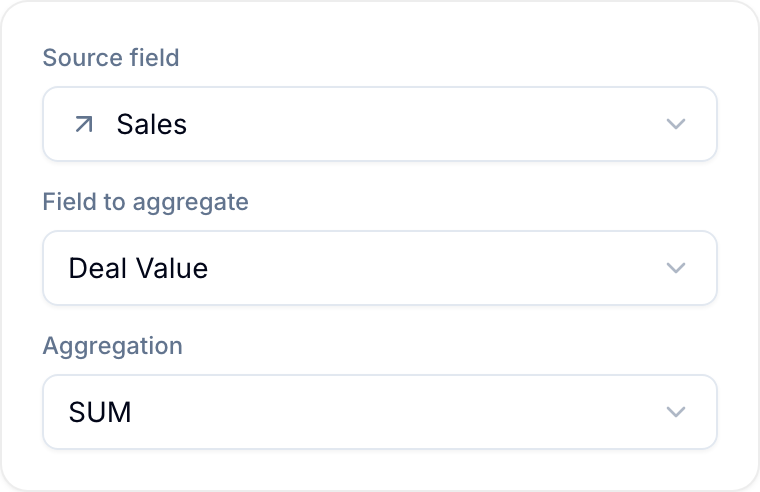
- Under Source field, select the Reference or Referenced By field.
- Under Field to aggregate, select a field from the linked records.
- If the field you selected is a Table field, select the column to aggregate under Table column. See Aggregate a Table column.
- Under Aggregation, select a compatible function.
- Under Filter source records (optional), add conditions to limit the linked records included in the result.
The optional filter uses the same advanced filter conditions as saved views.
Aggregation Functions
| Function | What it does |
|---|---|
| SUM | Adds up the values across linked records. |
| AVERAGE | The mean of the values across linked records. |
| COUNT | How many linked records there are in total, whether or not the chosen field is filled. |
| COUNTA | How many linked records have a value in the chosen field; empty values are not counted. |
| MIN | The smallest value, or the earliest date. |
| MAX | The largest value, or the latest date. |
| ARRAYJOIN | Joins the values from every linked record into a single comma-separated list. |
Compatible Field Types
The selected field type determines which functions are available:
- SUM, AVERAGE: Number, Currency, Percent, Star Rating, and Duration.
- MIN, MAX: the same numeric fields, plus Date for the earliest or latest date.
- COUNT, COUNTA: any field type because these functions count records.
- ARRAYJOIN: single-line text, multi-line text, single select, multiple select, email, URL, country, and phone fields.
Aggregate A Table Column
A Rollup can aggregate one column inside a Table field instead of a whole field. For example, sum a Qty column across the line items of every linked order.
When the field you select under Field to aggregate is a Table field, a Table column picker appears:
- Select a column to aggregate the values in that column across the rows of every linked record.
- Select Whole table (no column) to count rows instead. Only COUNT and COUNTA are available.
The column type determines which functions are available:
- SUM, AVERAGE, MIN, MAX: Number, Currency, and Formula columns.
- COUNT, COUNTA: any column type. COUNT counts every row. COUNTA counts only the rows that have a value in the selected column.
ARRAYJOIN is not available for a Table column.
Currency columns follow the same rule as Currency fields: all the values in a SUM, AVERAGE, MIN, or MAX must use the same currency.
Examples
- Workspace budget: On a parent record with a Reference to cost records, use SUM on Cost. Filter out cancelled records.
- Open bugs per release: On a release record, use COUNT on a Referenced By field. Filter the Bugs workspace to status Open.
- Customer lifetime value: On a customer record, use SUM on the total from every linked order.
- Next deadline: Use MIN on Due Date across linked open records.
- Assigned team: Use ARRAYJOIN on assignee names across linked records.
- Order total: On a customer record, use SUM on the Amount column of a Table field that holds the line items of each linked order.
Rollup Behavior
Blue computes Rollups in the background. It refreshes the result when the linked records or aggregated values change.
- One currency per Rollup: For SUM or AVERAGE on a Currency field, all linked values must use the same currency. Blue shows an error instead of adding different currencies.
- Read-only result: Change the source records to change the Rollup value.
- Required source: If someone deletes the source Reference or Referenced By field, select a new source to restore the Rollup.