'%20fill='%23fff'%3e%3cpath%20d='M24%20364.337V24h141.909c25.481%200%2046.833%203.601%2064.056%2010.803%2017.222%207.191%2030.183%2017.279%2038.882%2030.24s13.049%2027.972%2013.049%2045.041c0%2012.961-2.72%2024.513-8.148%2034.645-5.429%2010.142-12.906%2018.534-22.431%2025.174-9.526%206.651-20.548%2011.299-33.069%2013.953v3.325c13.732.661%2026.451%204.383%2038.134%2011.134%2011.684%206.762%2021.077%2016.155%2028.168%2028.17%207.092%2012.025%2010.638%2026.231%2010.638%2042.628%200%2018.281-4.647%2034.601-13.952%2048.939-9.305%2014.35-22.762%2025.648-40.381%2033.908-17.607%208.248-38.992%2012.377-64.143%2012.377H24zm82.258-200.414h45.534c8.975%200%2016.947-1.497%2023.929-4.493s12.432-7.312%2016.374-12.961c3.931-5.65%205.902-12.466%205.902-20.439%200-11.409-4.041-20.384-12.135-26.926-8.082-6.53-18.995-9.801-32.738-9.801h-46.866v74.62zm0%20134.109h50.853c17.839%200%2030.987-3.381%2039.466-10.131%208.479-6.762%2012.708-16.178%2012.708-28.247%200-8.755-2.049-16.309-6.145-22.686-4.096-6.365-9.922-11.298-17.443-14.789-7.532-3.491-16.561-5.231-27.089-5.231h-52.339v81.095l-.011-.011zM388.865%2024v340.337h-81.256V24h81.256zm181.618%20230.159V109.082h81.091v255.255h-77.435v-47.529h-2.665c-5.649%2015.616-15.263%2028.004-28.829%2037.145-13.578%209.14-29.941%2013.71-49.102%2013.71-17.398%200-32.683-3.986-45.864-11.97-13.181-7.973-23.433-19.14-30.745-33.489s-11.023-31.165-11.133-50.437V109.082h81.256v146.739c.11%2013.854%203.766%2024.767%2010.968%2032.74s17.002%2011.96%2029.413%2011.96c8.082%200%2015.372-1.795%2021.847-5.407%206.486-3.601%2011.628-8.865%2015.45-15.781%203.821-6.927%205.737-15.318%205.737-25.174h.011zm224.376%20115.002c-26.704%200-49.718-5.286-69.044-15.869-19.337-10.583-34.181-25.703-44.532-45.371-10.362-19.668-15.537-43.069-15.537-70.215s5.208-49.445%2015.614-69.212c10.418-19.779%2025.096-35.174%2044.037-46.197s41.261-16.53%2066.962-16.53c18.17%200%2034.787%202.83%2049.851%208.48s28.08%2014.007%2039.048%2025.086%2019.501%2024.734%2025.591%2040.966%209.14%2034.81%209.14%2055.756v20.273H694.145v-47.199h146.226c-.11-8.633-2.159-16.342-6.145-23.104s-9.448-12.047-16.374-15.869-14.866-5.726-23.841-5.726-17.233%202.015-24.424%206.057c-7.202%204.052-12.906%209.537-17.112%2016.452-4.207%206.927-6.431%2014.757-6.652%2023.512v48.025c0%2010.417%202.049%2019.525%206.145%2027.332s9.911%2013.876%2017.454%2018.193c7.532%204.317%2016.506%206.486%2026.924%206.486%207.201%200%2013.731-1.002%2019.612-2.995%205.869-1.993%2010.912-4.923%2015.119-8.81%204.206-3.876%207.367-8.645%209.47-14.294l74.616%202.158c-3.105%2016.728-9.889%2031.264-20.361%2043.62s-24.182%2021.937-41.129%2028.743c-16.947%206.816-36.559%2010.219-58.825%2010.219l.011.033z'/%3e%3c/g%3e%3cdefs%3e%3cclipPath%20id='A'%3e%3cpath%20fill='%23fff'%20transform='translate(24%2024)'%20d='M0%200h892v345.161H0z'/%3e%3c/clipPath%3e%3c/defs%3e%3c/svg%3e)
Lookup
Show data from records connected through a Reference custom field, and optionally edit it in place.
A Lookup custom field displays data from records in another workspace. A Reference custom field connects the records, and the Lookup field provides visibility into selected data.
A Lookup field connects to a specific Reference or Referenced By field. The Lookup field displays data from the connected records. A Lookup field is read-only unless a Project Administrator turns on Allow edits.
A Lookup field can display:
- Created at: When the referenced record was created.
- Updated at: The last date and time when the referenced record was updated in any way.
- Due Date: The referenced record’s start/due date and time.
- Description: The description field of the referenced record.
- List: Shows the list that the referenced record belongs to.
- Tag: Any tags that the referenced record is tagged with.
- Assignee: Any assignees on the referenced record.
- Referenced by: Any records that reference the referenced record.
- Any Custom Field: Any supported custom field from the referenced record. A Table field displays its rows as a read-only grid inside the record.
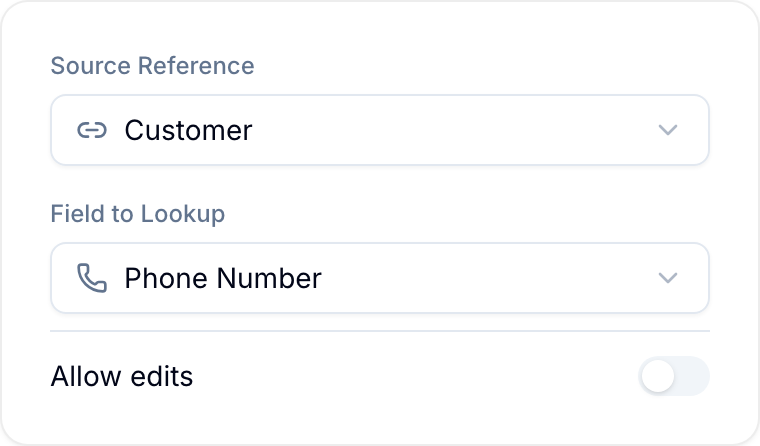
Allow edits
By default a Lookup field only shows data. Turn on Allow edits in the field’s configuration to let people change the value from this workspace. The edit writes through to the source record in the source workspace, so it changes that record for everyone.
You can allow edits through a Reference field or a Referenced By field. For Referenced By, you must select one source workspace in the field configuration. An unscoped Referenced By field can return records from different workspaces, so its Lookup fields stay read-only.
Each entry shows the source record’s title and the workspace it lives in, so it is clear what an edit changes. If the Lookup has more than three entries, they collapse until you expand them. An empty entry shows Set value.
Allow edits appears only for target data Blue can write back to:
- Due date, Assignee, Tag, List, and Description on the referenced record.
- These custom field types: Single Line Text, Multiple Line Text, Number, Percent, Star Rating, Email, Phone Number, URL / Link, Checkbox, Date, Country, Location / Map, Currency, Single Select, Multiple Select, Reference, and Assignee.
Created at and Updated at are system values. Referenced By, Formula, Rollup, Lookup, File, and Table values also cannot be edit targets. The toggle is not offered for those target types.
An Assignee custom field shows the people assigned in that field on the source record. Editing it opens a member picker. A field configured for one person accepts one selection, and a field restricted to specific users or roles offers only those people.
Who can edit
Editing is controlled by the source workspace, not by the workspace holding the Lookup field. To edit an entry you must:
- Be a member of the source workspace, with an access level that is not View Only or Comment Only.
- Have a role that permits editing records, and permits that specific field.
- For the List value, be an Owner, Admin, or Member of the source workspace.
The source workspace must also be active — you cannot edit through a Lookup into an archived or deleted workspace. Blue shows the entry as read-only when you do not have these rights.
Use a Reference across three workspaces
A Lookup can follow a Reference field in the immediately connected workspace to show records from a third workspace.
For example:
- In Workspace A, create a Reference field to Workspace B and select the relevant records from Workspace B.
- In Workspace C, create a Reference field to Workspace A and select the relevant records from Workspace A.
- In Workspace C, create a Lookup field. Choose the Reference field from Workspace C to Workspace A as the Source Reference, then choose the Reference field from Workspace A to Workspace B as the Field to Lookup.
The Lookup field in Workspace C displays the Workspace B records selected through the Reference field in Workspace A.
Chained lookup behavior
- The source Reference or Referenced By field must be in the same workspace as the Lookup field.
- Workspace C needs a connection to Workspace A, but it does not need a direct connection to Workspace B.
- The chain displays the records selected by the Reference field in Workspace A. It does not display other fields from those Workspace B records.
- Changes to the selected records appear automatically in the Lookup field.