Duplicate Detection
Identify possible duplicate records by comparing record names during record creation.
Duplicate detection compares a new record name with the names of records loaded for the current workspace. Blue warns you when fuzzy matching finds a possible duplicate.
Enable duplicate detection
The setting applies to the whole workspace:
- Open Workspace Settings.
- Select Databases at the top of the side navigation, and choose a database in Database.
- Select Records and find Record Options.
- Turn on Duplicate detection. Blue saves the setting automatically.
Blue checks names entered in the Board and Table quick add in the current workspace. The Create Record dialog checks only when its destination is the workspace that is currently open.
Review similar records
When you enter a name, Blue searches the current workspace for similar names. If it finds matches, Similar Records Found shows:
- The new name
- Similar records and their similarity percentages
- Actions to open an existing record or create the new record
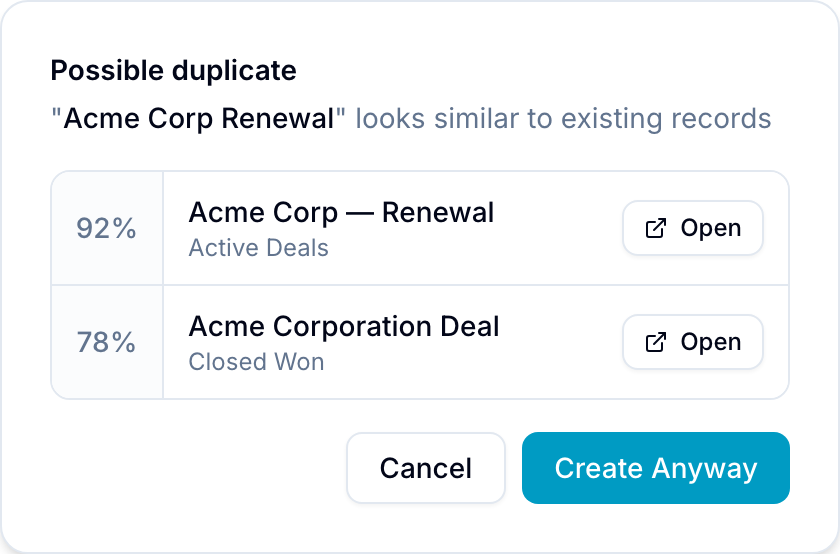
Choose one action:
- Select Open next to a similar record to open it instead. Blue closes the dialog and opens the record panel.
- Select Create Anyway if the matches are not duplicates. Blue creates the new record.
- Select Cancel to close the dialog and change the name.
Similarity matching
Fuzzy matching detects:
- Exact duplicates
- Minor spelling differences
- Similar phrases
- Partial matches
Use the displayed percentage to compare each match with the new name.
Supported creation locations
Duplicate detection runs in these record creation locations:
- Board quick add: The inline field in a board column
- Table quick add: The quick-add row in the Table view
- Create Record Dialog: The full dialog opened with the R shortcut, when its destination is the currently open workspace
Workspace scope
Blue searches only records loaded for the current workspace. The Create Record dialog does not check from an organization-level page or when you select a different destination workspace.
Use descriptive record names to give fuzzy matching more information. Review the matches before you select Create Anyway, especially in workspaces with many records.