Cover Images
Show card previews from images in record descriptions, comments, or file custom fields.
Cover images show a visual preview on record cards. Blue gets the preview from the source configured for the database.
Enable and configure cover images
- Open Workspace Settings and select Databases.
- Select the database, then open Card Interface.
- Turn on Image Cover Options.
- Choose the Source. For File field, select the field that supplies the images.
- Under Image selection, choose First Image, Last Image, or Multiple.
- For Multiple, set Maximum images from 1 to 25. The default is 4.
- For a single image, choose Cover or Contain under Image fit.
Blue saves the configuration for the database and processes its existing records. Cover images update when the source content or configuration changes.
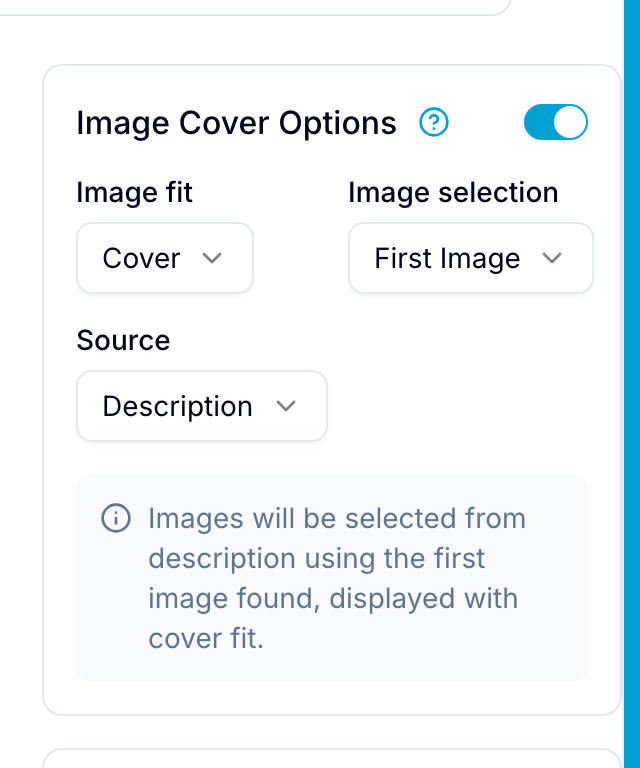
Image sources
Choose one source for the database:
- Description: Uses images embedded in record descriptions. This is the default source.
- Comments: Uses images from record comments.
- File field: Uses files from a File field or a Lookup of a File field.
If images are part of the record brief, select Description. Select Comments for images added during discussions, or File field for a dedicated file field.
Image selection
If the source contains more than one image, choose which image Blue displays:
- First Image: Uses the first image found. This is the default.
- Last Image: Uses the last image found.
- Multiple: Combines the first images into one grid, up to Maximum images. Each full image remains visible. If fewer images are available, Blue uses those images.
Multiple always uses Contain fit. A manually selected, locked cover keeps its single image until you remove the override.
Display fit
- Cover: Fills the preview area. Blue can crop the image edges to keep its aspect ratio. This is the default.
- Contain: Shows the complete image. The preview can contain empty space around it.
Use Cover when cropping is acceptable. Use Contain for diagrams or screenshots that must remain fully visible.
Processing existing records
Blue starts processing existing records when you enable cover images or save a configuration change.
- Blue shows processing progress in real time.
- Blue processes 50 records in each batch.
- You can continue working during processing.
- Blue refreshes the lists when processing finishes.
Supported files
For Description and Comments sources, Blue supports:
- JPEG and JPG images
- PNG images, including transparency
- GIF images with a static preview
For a File field source, Blue also makes a preview from:
- HEIC and HEIF photos, such as those from an iPhone.
- PDF files. Blue uses the first page.
Other file types display their file-type icons instead of a preview.
Blue makes these previews shortly after the upload finishes, so a cover can take a moment to appear on a large photo or PDF. Blue also makes one the first time a card asks for a preview of an older file.
Files must be uploaded to Blue. External image URLs are not supported.
Limits
- Bulk cover generation supports up to 6,000 records in a workspace.
- Field sources can be File fields or Lookups of File fields.
- Cover images are view-only. You cannot edit them directly.
Automatic updates
Blue regenerates covers after these changes:
- The record description changes while Description is the source.
- A comment with an image is added while Comments is the source.
- Files change while File field is the source.
- The cover configuration changes.
- The display fit changes.
API access
Cover images are available through the GraphQL API:
- Configure covers with the
setTodoCoverConfigmutation. - Read cover data from the
coverfield on theTodotype. - Monitor processing with the
subscribeToCoverGenerationProgresssubscription. - Use automatically generated thumbnail URLs at
/uploads/{uid}/thumbnail/cover.
Related features
- Images submitted through Forms can become cover images.
- The API supports cover configuration and cover data.
- A File field or a Lookup of files can be a cover source.