Currency
Store monetary amounts in one or more allowed currencies, and convert amounts between currencies with a Currency conversion field.
A Currency field stores a monetary amount and its currency on each record. A Currency conversion field shows the amount of a Currency field converted into a different currency.
Organization Owners and Admins, and workspace Project Administrators, can create and change fields.
Set the allowed currencies
When you create a Currency field, add one or more currencies under Allowed Currencies. People can enter values in any of these currencies.
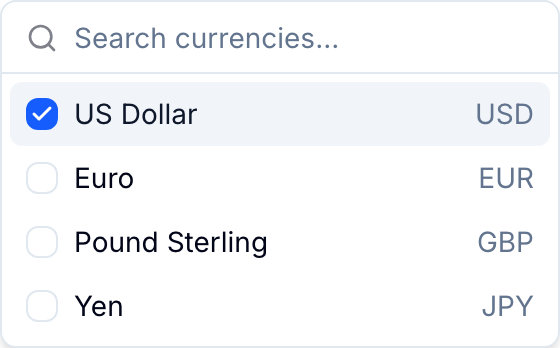
- Select a quick-add currency code, or select Browse all currencies.
- In the browser, search by name or code, and select each currency to add.
- Drag the currencies to change their order. The first currency is the default for a new value.
- To remove a currency, point to it and select the X icon.
Supported currencies
Blue supports over 80 currencies:
- UAE Dirham (AED)
- Argentine Peso (ARS)
- Australian Dollar (AUD)
- Bosnia-Herzegovina Convertible Mark (BAM)
- Barbadian Dollar (BBD)
- Bangladeshi Taka (BDT)
- Bulgarian Lev (BGN)
- Bahraini Dinar (BHD)
- Bolivian Boliviano (BOB)
- Brazilian Real (BRL)
- Bitcoin (BTC)
- Botswana Pula (BWP)
- Canadian Dollar (CAD)
- Swiss Franc (CHF)
- Chilean Peso (CLP)
- Chinese Yuan (CNY)
- Colombian Peso (COP)
- Costa Rican Colón (CRC)
- Czech Koruna (CZK)
- Danish Krone (DKK)
- Dominican Peso (DOP)
- Algerian Dinar (DZD)
- Egyptian Pound (EGP)
- Ethiopian Birr (ETB)
- Ethereum (ETH)
- Euro (EUR)
- British Pound (GBP)
- Georgian Lari (GEL)
- Ghanaian Cedi (GHS)
- Guatemalan Quetzal (GTQ)
- Hong Kong Dollar (HKD)
- Hungarian Forint (HUF)
- Indonesian Rupiah (IDR)
- Israeli Shekel (ILS)
- Indian Rupee (INR)
- Icelandic Krona (ISK)
- Jamaican Dollar (JMD)
- Jordanian Dinar (JOD)
- Japanese Yen (JPY)
- Kenyan Shilling (KES)
- Cambodian Riel (KHR)
- South Korean Won (KRW)
- Kuwaiti Dinar (KWD)
- Kazakhstani Tenge (KZT)
- Sri Lankan Rupee (LKR)
- Moroccan Dirham (MAD)
- Malagasy Ariary (MGA)
- Mauritian Rupee (MUR)
- Mexican Peso (MXN)
- Malaysian Ringgit (MYR)
- Mozambican Metical (MZN)
- Namibian Dollar (NAD)
- Nigerian Naira (NGN)
- Norwegian Krone (NOK)
- Nepalese Rupee (NPR)
- New Zealand Dollar (NZD)
- Omani Rial (OMR)
- Peruvian Sol (PEN)
- Philippine Peso (PHP)
- Pakistani Rupee (PKR)
- Polish Zloty (PLN)
- Qatari Riyal (QAR)
- Romanian Leu (RON)
- Russian Ruble (RUB)
- Saudi Riyal (SAR)
- Swedish Krona (SEK)
- Singapore Dollar (SGD)
- Thai Baht (THB)
- Tunisian Dinar (TND)
- Turkish Lira (TRY)
- Trinidad and Tobago Dollar (TTD)
- Taiwan Dollar (TWD)
- Tanzanian Shilling (TZS)
- Ukrainian Hryvnia (UAH)
- Ugandan Shilling (UGX)
- US Dollar (USD)
- Uruguayan Peso (UYU)
- Venezuelan Bolívar Soberano (VES)
- Vietnamese Dong (VND)
- Eastern Caribbean Dollar (XCD)
- South African Rand (ZAR)
- Zambian Kwacha (ZMW)
Enter currency values
- Select the field on a record.
- Enter the Amount.
- If the field allows more than one currency, select the Currency.
- Select Done.
Blue formats the amount for the currency. Dollar currencies show the currency code before the symbol so that you can tell them apart. For example, Blue shows US Dollars as USD$1,000.50 and Euros as 1.500,25 €.

Convert currencies
A Currency conversion field reads the amount of a Currency field and shows it in a target currency. Blue calculates the value. You cannot type in it.
Configure these settings when you create the field:
- Source Field: the Currency field to convert from.
- Exchange Rate Date: the date of the exchange rate that Blue uses.
- Live: the date on which the source value changes.
- Fixed Date: a date that you pick.
- From Field: the date in Due Date or in a Date field that you select.
- Conversion Rules: each rule has a source currency and a target currency. The source list shows the allowed currencies of the source field. Select Any to convert every currency that has no rule of its own. Select Add rule to add more rules.
If the source currency and the target currency are the same, Blue shows the amount unchanged. If no rule matches the source currency, the field stays empty.
Use currency data
- Record transaction amounts.
- Store budgets.
- Track invoice totals.
- Record payment amounts.
- Report revenue in one currency when amounts arrive in several currencies.