Time duration
Measure the time between a start event and an end event on each record.
A Time duration field calculates the time between two events on a record. Blue calculates the value. You cannot type in it.
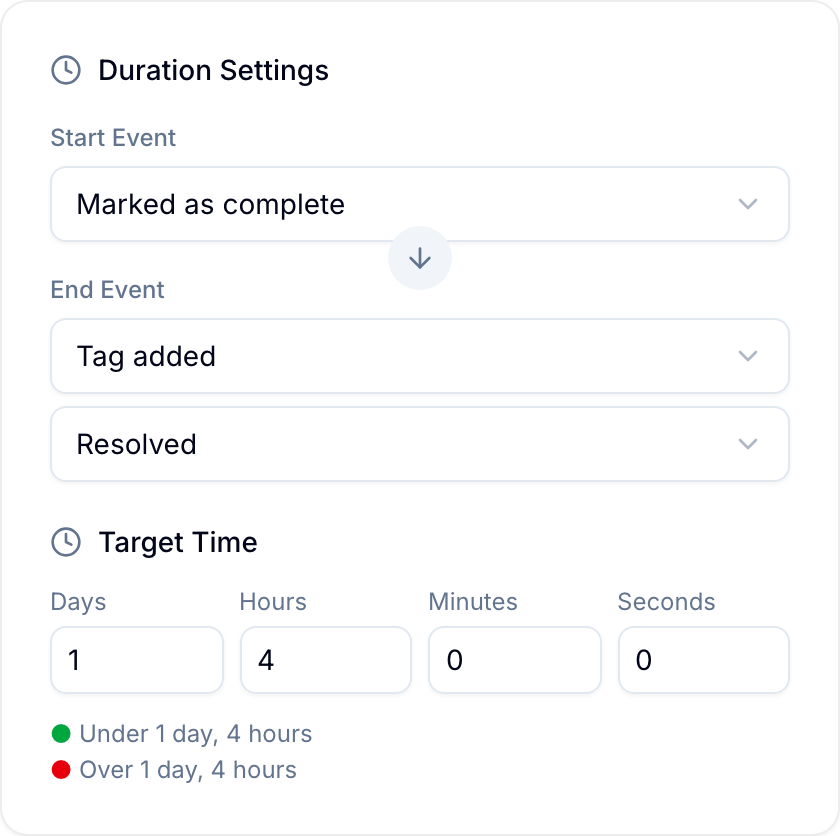
Choose the start and end events
Organization Owners and Admins, and workspace Project Administrators, set a Start Event and an End Event in the field’s Duration Settings. Choose one of these events for each:
- Record created: when the record was created.
- Record marked complete: when the record was marked as complete.
- Due date: the start date or end date of the record’s Due date field.
- Record moved to list…: when the record’s List field changed to the value you select.
- Tag added…: when the tag you select was added to the record’s Tags field.
- Assignee added…: when the person you select was assigned to the record.
- Custom field changed…: when a Select (single) or Select (multi) field changed to the option you select, or the start date or end date of a Date field.
An event can happen more than once. For example, a record can move to the same step twice. Under If multiple times, choose Earliest action or Latest action. For a date, choose Start date or End date.
If the end event is earlier than the start event, Blue still shows a positive duration.
Set a target time
Under Target Time, enter days, hours, minutes, and seconds. Blue shows a color indicator on each record: green when the duration is under the target, and red when it is over. The target time is optional.
Choose a display format
Under Display Format, choose how Blue shows the duration:
| Format | Example |
|---|---|
| DD:HH:MM:SS | 02:07:57:22 |
| Written words | Two days, seven hours… |
| Short format | 2 days, 7 hours… |
Use duration data
Use a Time duration field to:
- Monitor service ticket or request resolution time for internal SLAs.
- Calculate sales cycle length from prospecting to a closed deal.
- Track order processing and fulfilment times.
- Measure manufacturing throughput from order to delivery.
- Determine patient wait times between intake and doctor visits.
- Analyze campaign lead nurturing time from prospect to customer.
- Track employee onboarding time from a job offer to full productivity.